Publish the corrected service pageKing Works · 50 min
Important
Task and focus management
Flagship · Private BetaProtect your attention. Ship what matters.
Ship Ledger keeps today’s most important work visible while protecting everything else from becoming a distraction.
PLAN · TRACK · SHIP
My DayPrivate Beta
The problem
A longer task list does not create a more focused day.
Task systems make it easy to collect work. They can also leave today’s priorities competing with future work, follow-ups, ideas, unfinished research, and interesting distractions.
The result can be plenty of activity without enough completed outcomes. Ship Ledger separates what must happen now from what can wait, while keeping everything recorded and easy to find.
The Ship Ledger difference
Choose the work. Protect the time. Finish the outcome.
Ship Ledger measures useful completion instead of rewarding the size of the task list.
- 01
Plan
Choose realistic work for the day and place it into a clear sequence.
- 02
Track
Keep details, follow-ups, assignments, checklists, dates, and focus time connected.
- 03
Ship
Complete the defined outcome, hand it off when appropriate, or consciously remove it.
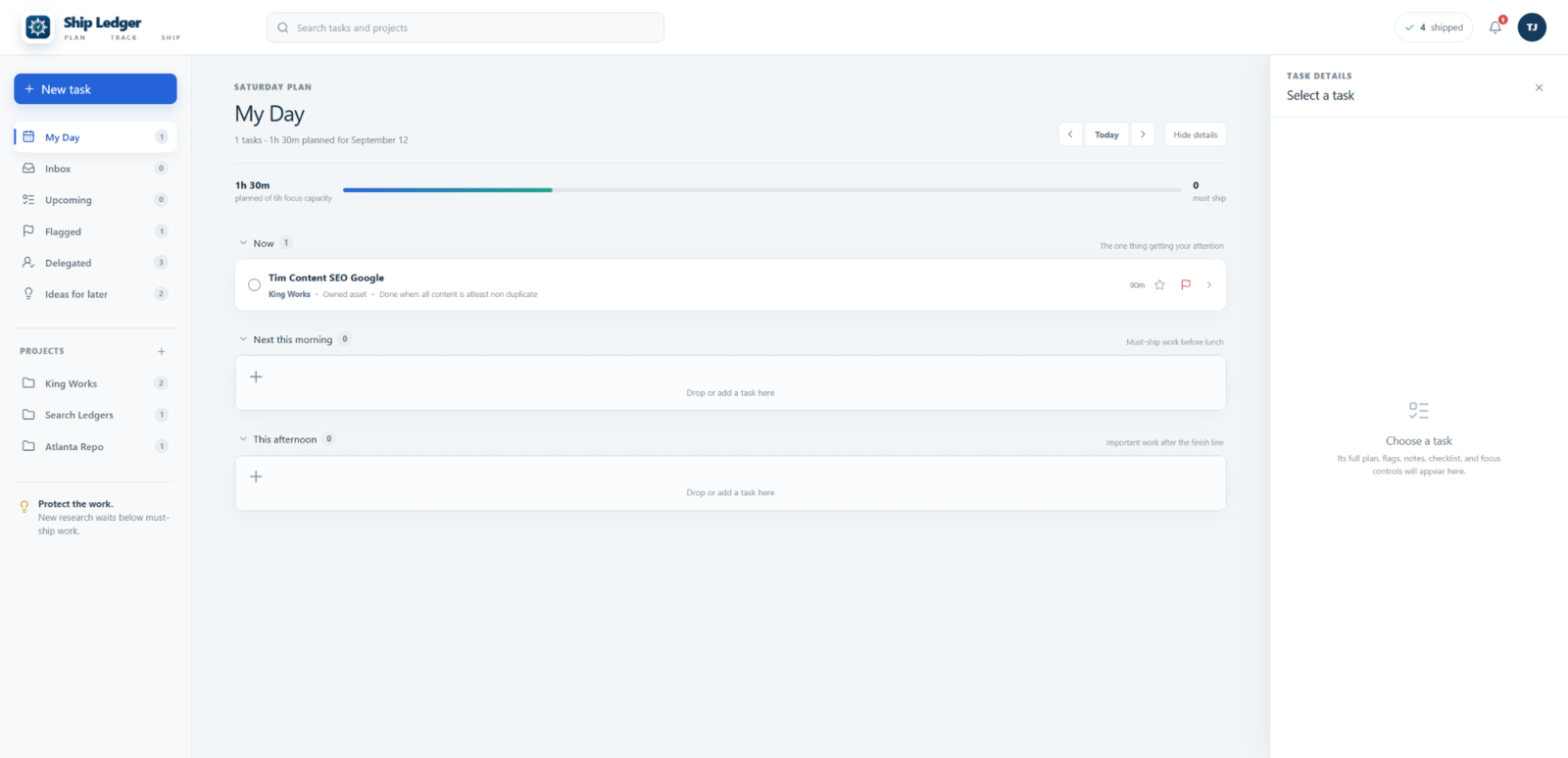
My Day
See the shape of your day.
Previous day, Today, and Next day navigation keep the date clear. Work is divided into Now, Next this morning, and This afternoon instead of appearing as one undifferentiated list.
- Planned tasks and defined outcomes
- Estimated duration and focus minimums
- Important and follow-up indicators
- Focus-capacity comparison and shipped count
- New Task and global Search controls
My Day
Saturday, September 12
Today
3h 20m plannedof 6h focus capacity
Now
Next this morning
Review SearchLedger feature mapKernvale · 35 min
Follow-upThis afternoon
Check citation delivery reportRepo Network · 25 min
ImportantRealistic workload planning
Plan the time you actually have.
Ship Ledger compares estimated work with available focus capacity so an overloaded plan is visible before the day begins. Estimates guide planning, but they are not predictions.
Today’s plan3h 20m planned
of 6h focus capacity
- Task estimates
- Minimum focus time
- Total planned time
- Over-capacity warning
- Drag to reorder work
Task details
ImportantPublish the corrected service page
- Project
- King Works
- Planned
- Today
- Estimate
- 50 minutes
- Focus minimum
- 25 minutes
Done When
The corrected service page is reviewed, published, and checked on mobile.
- Review final copy
- Publish page
- Check form and mobile layout
Complete task records
Keep the information needed to finish.
A task can stay quick when the work is simple or hold more context when needed: title, project, owner, dates, estimate, minimum focus time, flags, details, notes, checklist, and focus controls.
“Work on the website” is vague.
“Publish the corrected service page” gives the work a visible finish line.
No field exists merely to slow down capture. Details support the decision and the outcome.
Finish this first
One important outcome stays in front.
The focused view keeps the current priority, project, work type, finish line, and business reason together while the session is active.
One thing at a time.
New work waits until the current outcome is shipped, handed off, or removed.
Publish the corrected service page
Finish line
Page live, form checked, mobile layout verified.
Focus session18:42
25 minute minimum
Hand It OffRemove It
Focus sessions
Give the current task protected time.
Select the current task, use its minimum focus time, and start the timer. Pause or reset when needed while the outcome remains visible. Completed sessions are saved, and supported session state remains available after leaving the screen.
When the finish line is reached, mark the outcome shipped. Ship Ledger does not block websites, control the browser, or monitor employees.
Capture without distraction
Keep the thought. Protect the current work.
Save the thought without chasing it.
When something interesting pulls at you, put it here. Your current work stays open.
- Quick thought entry and saved count
- Review later
- Convert a useful thought into a task or idea
- Remove what no longer matters
Everything else can wait without being lost.
The protected queue keeps upcoming outcomes visible but secondary to the active task.
- Add and reorder outcomes
- Move work into the current position
- Preserve future work without competition
Capture work before deciding where it belongs.
New tasks can wait in the Inbox until they are scheduled, assigned, delegated, or moved into My Day.
- Quick creation and editable details
- Project, dates, estimate, and flags
- Capture does not equal today’s priority
Know what is coming before it becomes urgent.
See future commitments grouped by planned date with due dates, estimates, flags, follow-ups, and daily navigation.
- Move work between dates
- Return to Today quickly
- No implied calendar integration
Flags and follow-up
Important work should not disappear.
Important marks work with greater value, risk, or consequence. Follow-up marks work needing another check, response, confirmation, or action later.
- Flagged view and list indicators
- Follow-up dates where supported
- Edit or remove either flag
- A flag does not automatically mean urgent
Delegated work
Hand it off without forgetting it.
Record who has the next action, keep the details and notes, flag a follow-up, and review the outcome later. Delegated work stays out of the active queue until it needs attention.
- Assign an owner
- Hand off the current outcome
- Confirm before completing
- No employee surveillance
Projects
Keep related outcomes together.
Create and edit projects, assign tasks, review active and upcoming work, see flags, and preserve shipped outcomes by project.
Projects organize the work without replacing the daily focus view.
Ideas for later
An idea can be valuable without becoming today’s work.
Save product ideas, research topics, improvements, and useful context. Review them later, convert the ones that become actionable, and remove the ones that no longer matter.
Thought Inbox
Capture it quickly, then return to the open task.
Ideas for Later
Keep something worth considering without committing to it.
Inbox
Hold actionable work until its project and date are decided.
My Day
Show only the work intentionally selected for today.
Search and daily navigation
Find the work without reopening every mental tab.
Search tasks and outcomes, find project work, locate flags or delegated items, move between working days, and return to Today without losing task information across views.
Shipped outcomes
See what moved forward.
“Shipped” means the defined outcome was completed. The daily count and history preserve what finished, its project, and completed focus sessions while keeping removed work distinct.
Saved and persistent work
Your plan should still be there when you return.
The Private Beta is designed to preserve tasks, details, notes, checklists, projects, dates, flags, delegated items, ideas, thoughts, shipped outcomes, focus sessions, and relevant timer state across sessions and devices where supported.
Who Ship Ledger is for
For people with more worthwhile work than one day can hold.
Ship Ledger may fit independent workers and small operators who manage several projects, need dependable follow-up, want a structured day, and care more about completed outcomes than the size of a task list.
- Many ideas competing for attention
- Tabs kept open for later
- Several active projects
- Important follow-ups
- Future work worth preserving
- A structured daily plan
- Outcome-based completion
- Independent or small-team work
What Ship Ledger is not
A focused system, not an endless productivity platform.
Its purpose is to make the next meaningful outcome clear.
- A giant storage bin for endless tasks
- Employee surveillance software
- A social productivity feed
- A points-and-streaks game
- An automatic browser blocker
- An enterprise project-management suite
Ship Ledger by Kernvale
Plan the work. Protect the focus. Ship the outcome.
Ship Ledger gives today’s important work a clear place while keeping future tasks, follow-ups, delegated work, and ideas safely organized.
Request Private Access
Ship Ledger is the flagship Private Beta from Kernvale Software.
Simple tools. Real problems. Clear results.